Enable One-Way Server-Side Bucket Replication
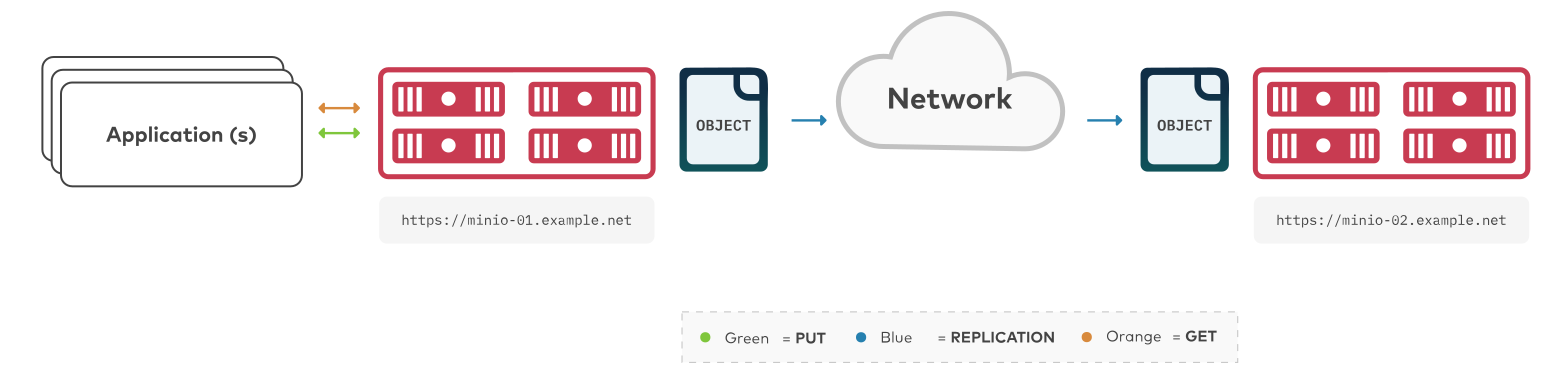
The procedure on this page creates a new bucket replication rule for one-way synchronization of objects from one MinIO bucket to another MinIO bucket. The buckets can be on the same MinIO deployment or on separate MinIO deployments.
To configure two-way “active-active” replication between MinIO buckets, see Enable Two-Way Server-Side Bucket Replication.
To configure multi-site “active-active” replication between MinIO deployments, see Enable Multi-Site Server-Side Bucket Replication
Note
To configure replication between arbitrary S3-compatible services (not necessarily MinIO), use mc mirror.
Requirements
Replication requires all participating clusters meet the following requirements. This procedure assumes you have reviewed and validated those requirements.
For more details, see the Bucket Replication Requirements page.
Considerations
Click to expand any of the following:
Replication of Existing Objects
MinIO supports automatically replicating existing objects in a bucket.
MinIO requires explicitly enabling replication of existing objects using the mc replicate add --replicate or mc replicate update --replicate and including the existing-objects replication feature flag.
This procedure includes the required flags for enabling replication of existing objects.
Replication of Delete Operations
MinIO supports replicating S3 DELETE operations onto the target bucket.
Specifically, MinIO can replicate versioning Delete Markers and the deletion of specific versioned objects:
For delete operations on an object, MinIO replication also creates the delete marker on the target bucket.
For delete operations on versions of an object, MinIO replication also deletes those versions on the target bucket.
MinIO requires explicitly enabling replication of delete operations using the mc replicate add --replicate or mc replicate update --replicate.
This procedure includes the required flags for enabling replication of delete operations and delete markers.
MinIO does not replicate delete operations resulting from the application of lifecycle management expiration rules.
See Replication of Delete Operations and Object Deletion for more complete documentation.
Multi-Site Replication
MinIO supports configuring multiple remote targets per bucket or bucket prefix. For example, you can configure a bucket to replicate data to two or more remote MinIO deployments, where one deployment is a 1:1 copy (replication of all operations including deletions) and another is a full historical record (replication of only non-destructive write operations).
This procedure documents one-way replication to a single remote MinIO deployment. You can repeat this tutorial to replicate a single bucket to multiple remote targets.
Procedure
Configure One-Way Bucket Replication Using the Command Line mc
This procedure uses the aliases SOURCE and REMOTE to reference each MinIO deployment being configured for replication.
Replace these values with the appropriate alias for your target MinIO deployments.
This procedure assumes each alias corresponds to a user with the necessary replication permissions.
Changed in version RELEASE.2022-12-24T15-21-38Z: mc replicate add automatically creates the necessary replication targets, removing the need for using the deprecated mc admin remote bucket add command.
This procedure only documents the procedure as of that release.
1) Create a New Bucket Replication Rule
Use the mc replicate add command to add a new replication rule to each MinIO deployment.
mc replicate add ALIAS/BUCKET \
   --remote-bucket 'https://USER:PASSWORD@HOSTNAME:PORT/BUCKET' \
   --replicate "delete,delete-marker,existing-objects"
Replace
ALIASwith the alias of the origin MinIO deployment. The name must match the bucket specified when creating the remote target in the previous step.Replace
BUCKETwith the name of the bucket to replicate from on the origin deployment.Replace the
--remote-bucketto specify the remote MinIO deployment and bucket to which theALIAS/BUCKETreplicates.The
USER:PASSWORDmust correspond to a user on the remote deployment with the necessary replication permissions.The
HOSTNAME:PORTmust resolve to a reachable MinIO instance on the remote deployment. TheBUCKETmust exist and otherwise meet all other replication requirements.The
--replicate "delete,delete-marker,existing-objects"flag enables the following replication features:See
mc replicate add --replicatefor more complete documentation. Omit any field to disable replication of that component.
Specify any other supported optional arguments for mc replicate add.
2) Validate the Replication Configuration
Use mc cp to copy a new object to the replicated bucket on one of the deployments.
mc cp ~/foo.txt ALIAS/BUCKET
Use mc ls to verify the object exists on the destination bucket:
mc ls ALIAS/BUCKET
See also
Use the
mc replicate updatecommand to modify an existing replication rule.Use the
mc replicate updatecommand with the--state "disable"flag to disable an existing replication rule.Use the
mc replicate rmcommand to remove an existing replication rule.
